Author: Philipp Gayret
Date: 2022-09-18
This entry contains tips on what you should and shouldn't do in GitHub Actions with bash.
Bash has options that you can set, with set, notably:
set -e - Exit immediately if a command exits with a non-zero status.set -o pipefail - Causes a pipeline (|) to return the exit status of the last command
in the pipe that returned a non-zero return value.
By default, GitHub Actions runs shell: bash sections with these options. Note that bash is the default
shell. However, when you invoke other bash scripts from your actions, you need to set these options yourself like
so;
#!/bin/bash
set -e -o pipefail
All above options are part of action-setup-bash
When dealing with errors in bash from GitHub Actions it can be fairly difficult to pinpoint where an error occurred.
Although you could throw in -x to trace all commands, it may be too noisy for end users of workflows.
Luckily, bash has options for this;
set -o errtrace - "If set, any trap on ERR is inherited by shell functions, command substitutions,
and commands executed in a subshell environment"
set -o functrace - "If set, any traps on DEBUG and RETURN are inherited by shell functions, command
substitutions, and commands executed in a subshell environment."
In other words, these options will make sure that any errors that occur in functions or subshells are also caught by
the trap command.
We can configure the trap command to print the line number and command that caused the error like so;
#!/bin/bash
set -e -o pipefail
set -o errtrace -o functrace
trap_error_report() {
    lineno=$1
    command=$2
    echo "Erred in bash at line $lineno on command: $command" >&2
}

trap 'trap_error_report "${LINENO}" "${BASH_COMMAND}"' ERR
Now when you run a script that contains an error, you'll always get a pretty error message, such as;
Erred in bash at line 5 on command: false
All above options are part of action-setup-bash

Code injection is a fairly common attack vector in GitHub Actions for workflows. Likely because GitHub's own documentation of how to use GitHub Actions is full of them.
If you are worried about the following;
Or
Then you'll want to prevent situations where an attacker can take over workflows. Here's the first example workflow by GitHub on their page on how to get started with GitHub Actions.
name: GitHub Actions Demo
on: [push]
jobs:
  Explore-GitHub-Actions:
    runs-on: ubuntu-latest
    steps:
      - run: echo "🎉 The job was automatically triggered by a ${{ github.event_name }} event."
      - run: echo "🐧 This job is now running on a ${{ runner.os }} server hosted by GitHub!"
      - run: echo "🔎 The name of your branch is ${{ github.ref }} and your repository is ${{ github.repository }}."
      - (...)
Unfortunately the suggested ${{ ... }} in run sections is a recipe for disaster; it's GitHub Actions syntax for
a string replacement at the YAML level. That means if your branch name ends with, say, $(env), we get;
- run: echo "🔎 The name of your branch is demo-$(env) and your repository ...
Which is going to run env, printing out all environment variables on the runner like so;
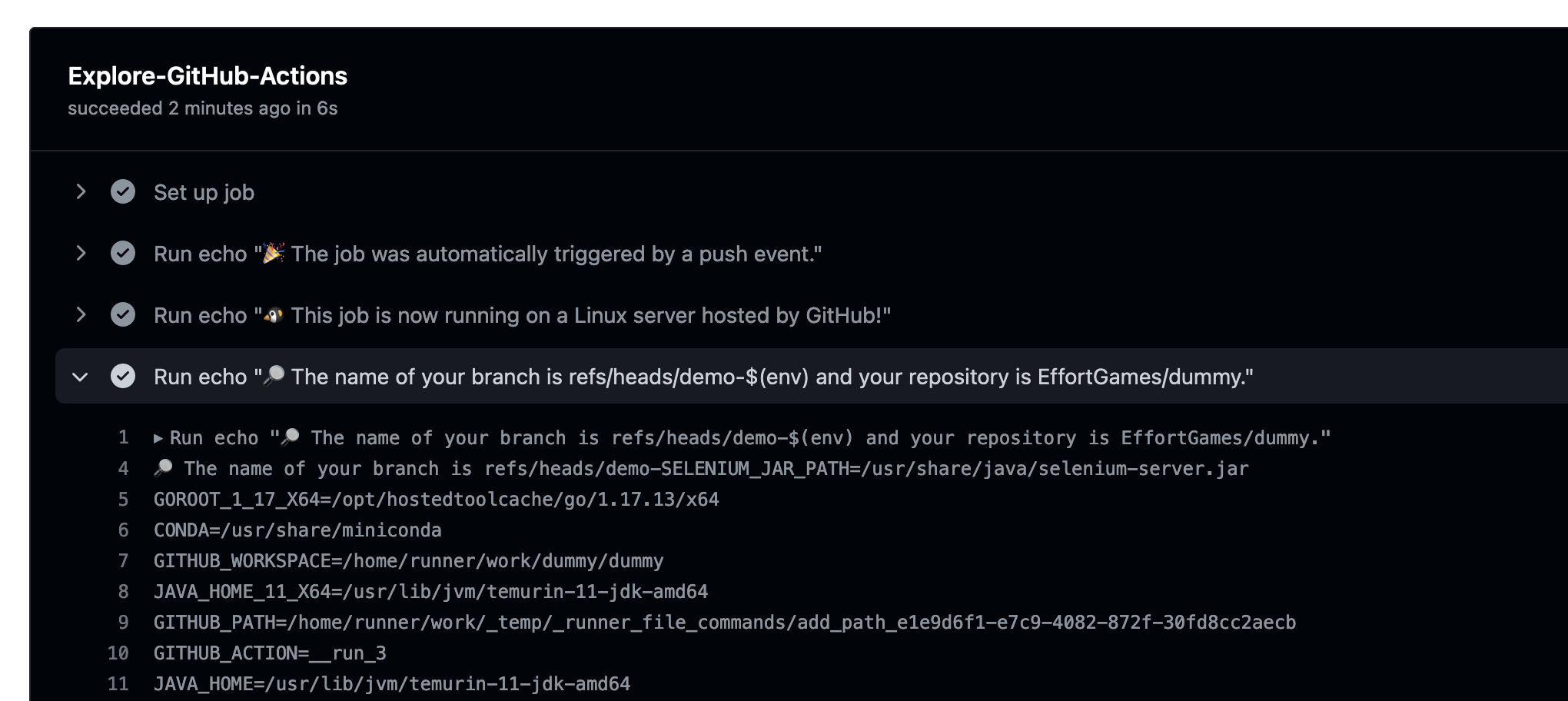
It shouldn't be too difficult for an attacker to go from "env" to say a reverse shell on your privileged runner. There is a fix, and it's fairly simple; Move templating into environment variables, like so;
name: GitHub Actions Demo
on: [push]
jobs:
  Explore-GitHub-Actions:
    runs-on: ubuntu-latest
    env:
        EVENT_NAME: ${{ github.event_name }}
        RUNNER_OS: ${{ runner.os }}
        BRANCH_NAME: ${{ github.ref }}
        REPOSITORY: ${{ github.repository }}
    steps:
      - run: echo "🎉 The job was automatically triggered by a $EVENT_NAME event."
      - run: echo "🐧 This job is now running on a $RUNNER_OS server hosted by GitHub!"
      - run: echo "🔎 The name of your branch is $BRANCH_NAME and your repository is $REPOSITORY."
      - (...)
This moves the templating out of bash, and into the more safe to use environment variables.
Note that for example with github.ref, most characters other than spaces
are allowed as branch or tags names, PR titles, usernames, and so forth. You only need $() or
"; to perform such an injection. So, be careful with what you run through the templating.
set -e -o pipefail to make sure your scripts fail when a command fails.set -o errtrace -o functrace to make sure errors in functions and subshells are caught.${{ ... }} templating in GitHub Actions' run blocks should be a compiler error, too
bad there isn't one.
jq and yq have similar injection issues; always use --arg.That concludes the entry! Shoutout to GitHub Copilot for writing half of the blog (GitHub Co-Author?). Shoutout to DALL E 2 for making the art.